




How to Connect a LiFePO4 Battery to a Growatt Inverter and Set the BMS Protocol
For solar energy storage systems, battery and inverter matching is one of the most important steps before installation. Many installers use Growatt off-grid inverters together with 48V or 51.2V LiFePO4 battery packs, but the system will only work reliably when the power wiring, BMS communication cable, and inverter protocol settings are correctly matched.
This guide explains the general connection logic between a LiFePO4 battery and a Growatt inverter, including battery power wiring, CAN/RS485 communication, lithium battery mode, protocol selection, and common troubleshooting steps. For many CHSHNY low-voltage LiFePO4 battery projects matched with Growatt off-grid inverters, we usually recommend using CAN communication and trying L51 first because it is simple for installers to set and easier to check during commissioning.
Before installation, always check the exact Growatt inverter manual, battery BMS manual, and local electrical safety requirements. Wiring and parameter changes should be carried out by qualified technicians.
1. Confirm the Battery and Inverter Specifications
Before connecting the system, confirm that the battery voltage range matches the inverter battery input range. Most residential LiFePO4 storage batteries are designed around 48V or 51.2V nominal voltage, but the charging voltage, discharge cut-off voltage, maximum charge current, and maximum discharge current must still match the inverter settings.
Installers should confirm:
- Battery nominal voltage and full charge voltage
- Maximum charge and discharge current
- Number of battery packs in parallel
- Battery BMS communication type: CAN or RS485
- Growatt inverter model and firmware version
- Recommended communication protocol from the battery supplier
If the battery and inverter are not confirmed before installation, the system may show communication faults, abnormal SOC display, charging limitation, or unexpected shutdown.
2. Connect the Battery Power Cables Safely
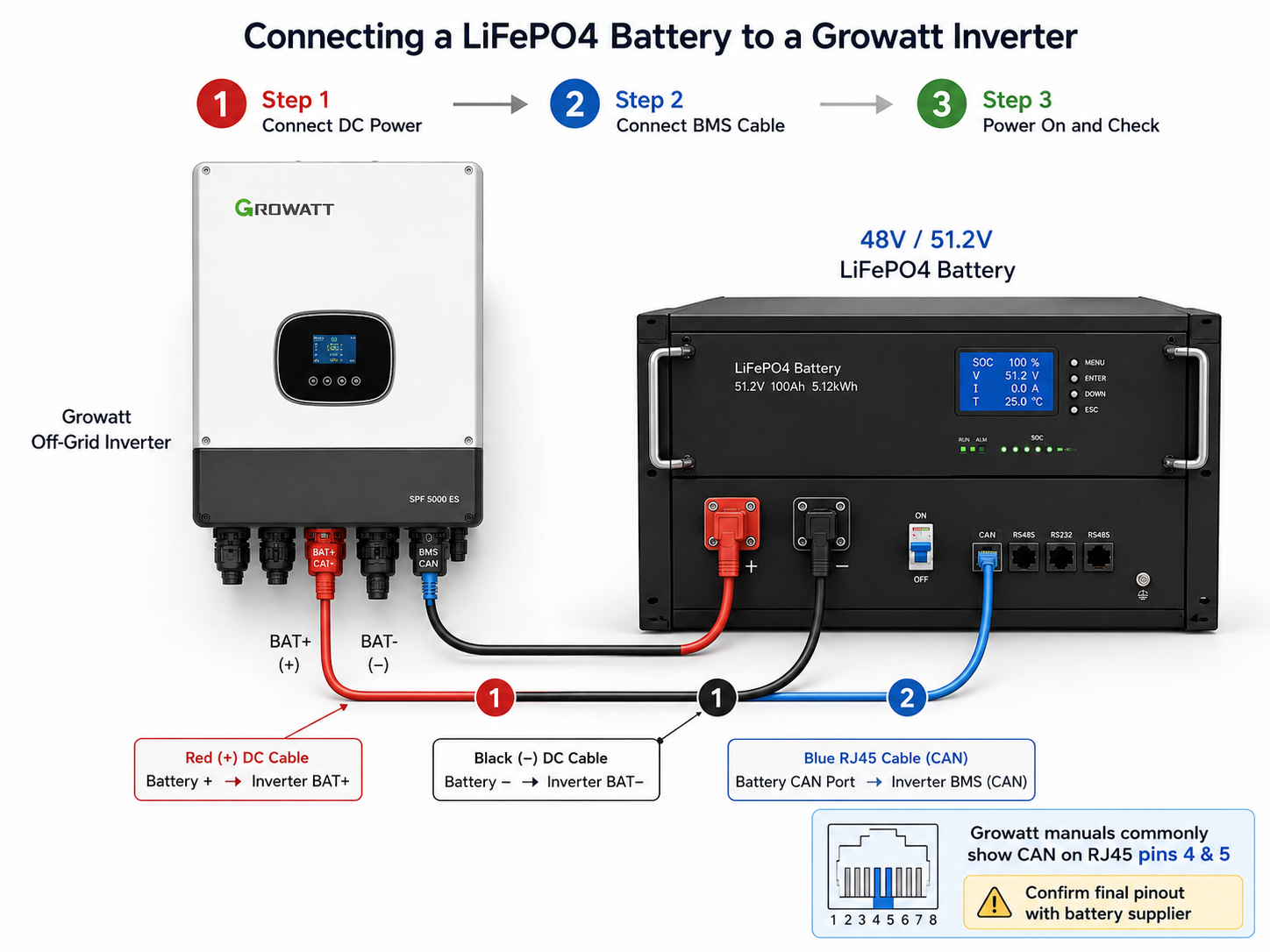
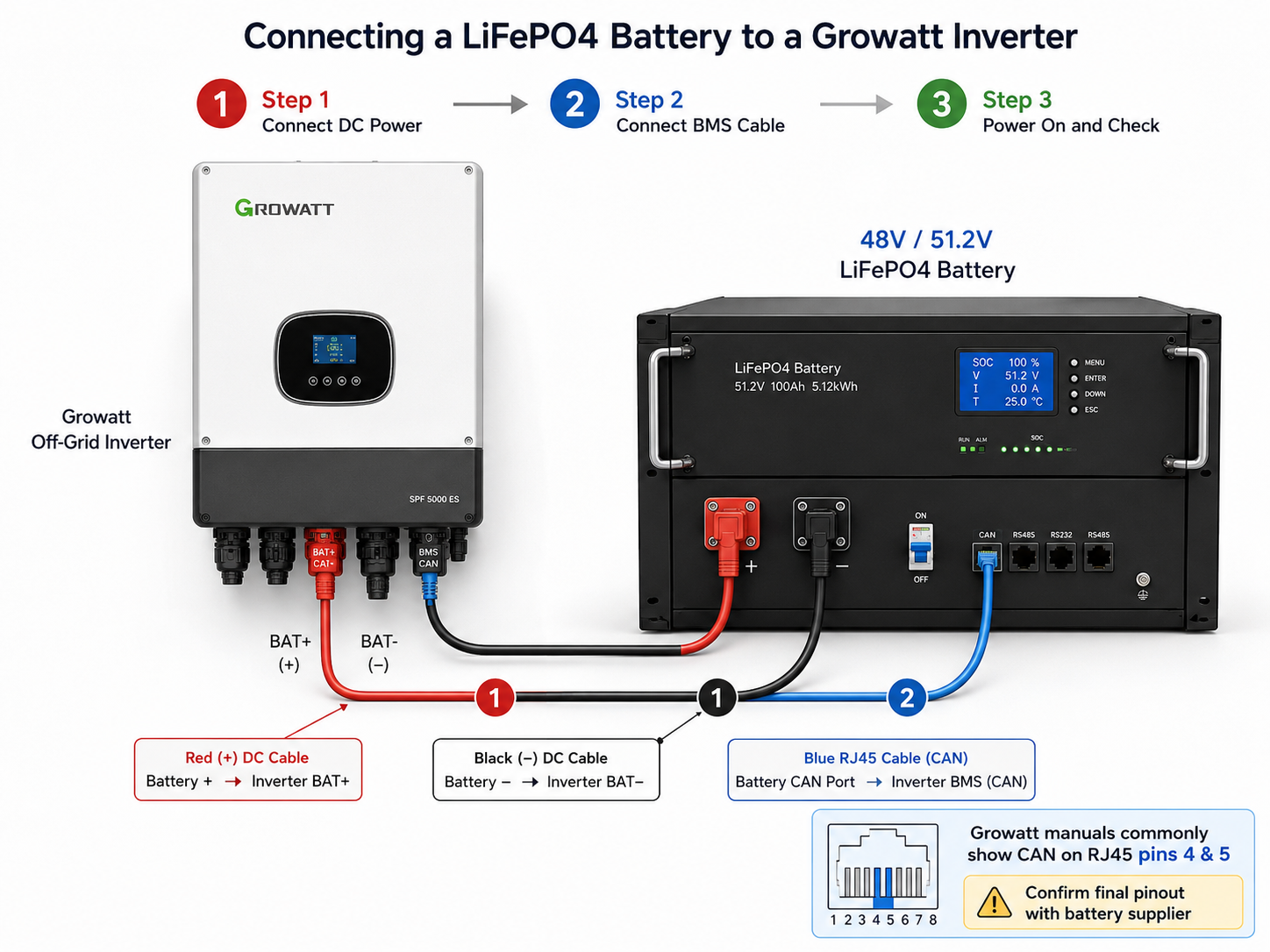
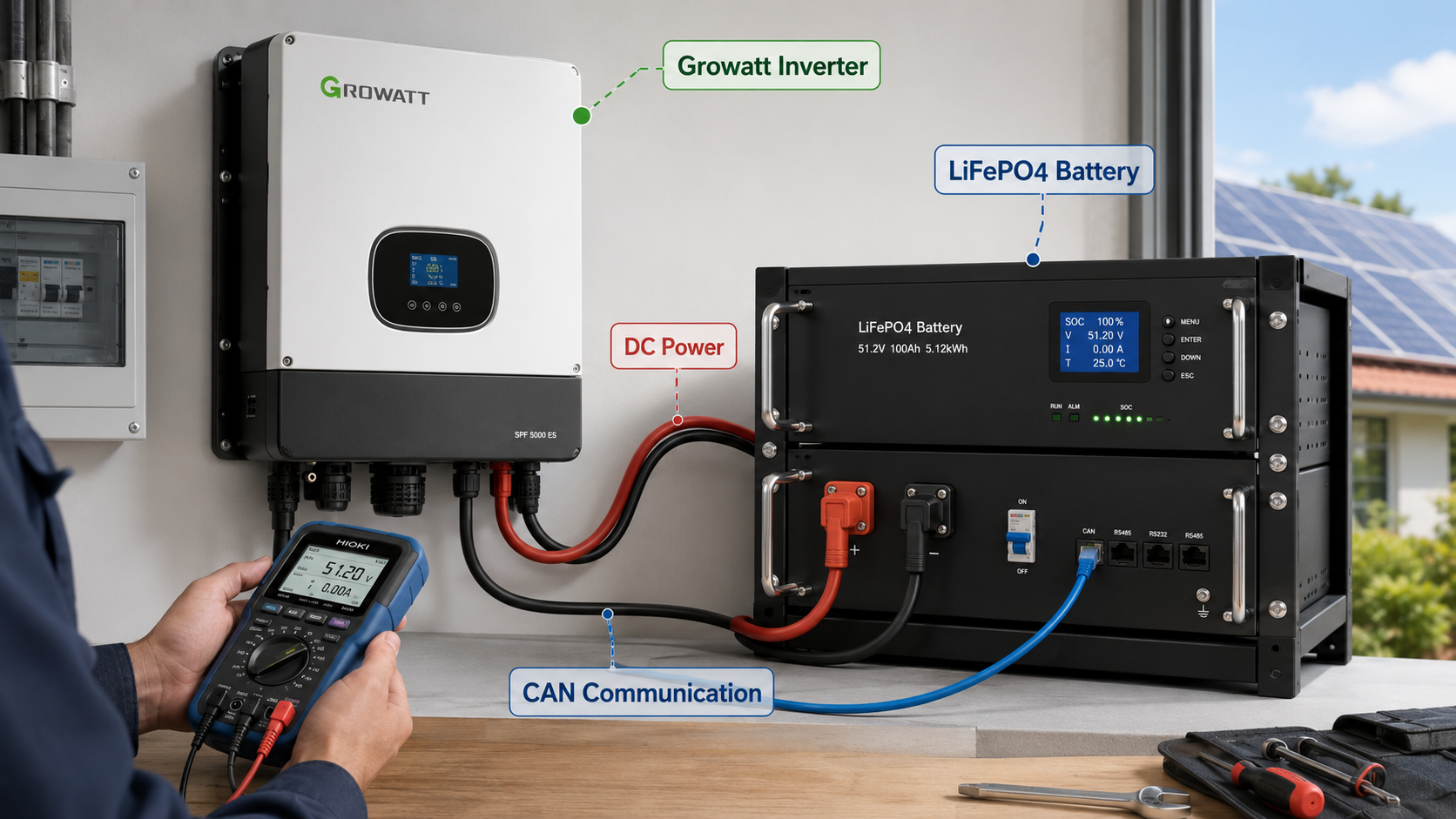
The battery positive terminal should connect to the inverter positive battery terminal, and the battery negative terminal should connect to the inverter negative battery terminal. Use suitable cable size, correct lugs, proper torque, and a DC breaker or fuse according to the system current.
Before wiring, turn off the inverter, battery breaker, PV input, and AC input. Check polarity carefully before energizing the system. Reverse polarity or loose terminals can damage the inverter, battery, or BMS.
For multiple battery packs in parallel, follow the battery supplier's parallel connection instructions. The battery address, DIP switch, or master/slave settings may also need to be configured depending on the BMS design.
3. Connect the BMS Communication Cable
For lithium battery communication, the inverter needs to read information from the battery BMS, such as SOC, charge current limit, discharge current limit, alarms, and protection status.
Growatt off-grid inverters commonly use an RJ45 communication port for BMS communication. Depending on the inverter model and battery BMS, the communication may use CAN or RS485.
Typical Growatt manual information shows:
- RS485 communication commonly uses RJ45 pins 1 and 2
- CAN communication commonly uses RJ45 pins 4 and 5
- The battery should connect to the inverter BMS communication port, not a normal internet router port
However, the final cable pinout must always be confirmed with the battery BMS supplier. A straight network cable may work for some battery models, while other batteries require a custom communication cable.
4. Set Growatt Battery Type to Lithium Mode
On many Growatt SPF off-grid inverter models, the battery type must be set to lithium mode before BMS communication can work.
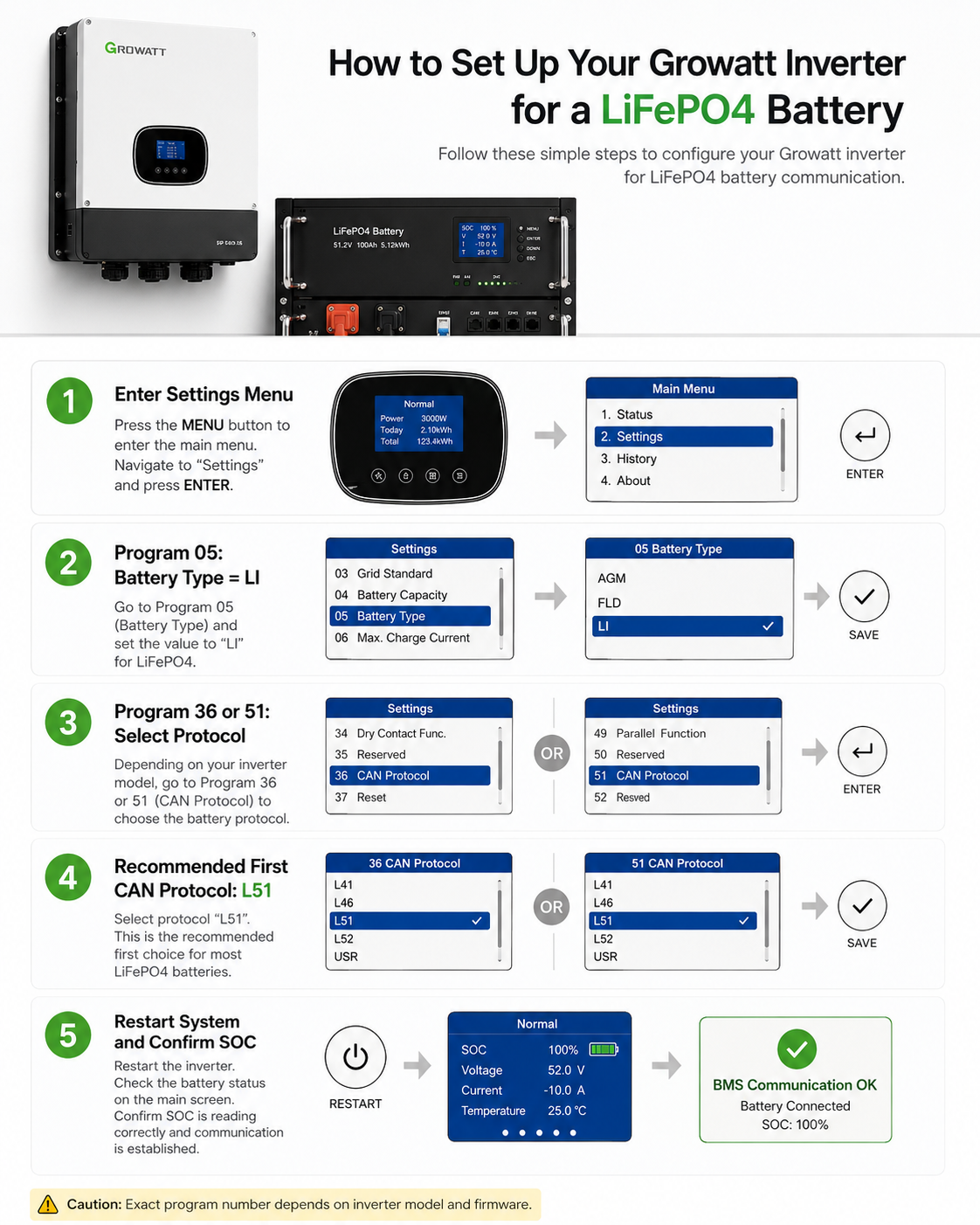
The common setting path is:
- Enter the inverter setting menu.
- Find Program 05, Battery Type.
- Select LI for lithium battery with BMS communication.
- After selecting LI, the inverter will enter the communication protocol setting menu.
Depending on the Growatt model and firmware, the protocol setting may appear under Program 36 or Program 51. Always follow the manual for the exact inverter model.
Video: Growatt 6kW Lithium Battery Protocol Setup
The following commissioning video shows the Growatt 6kW inverter lithium battery protocol setup process for installer reference.
5. Select the Correct CAN or RS485 Protocol
After selecting lithium battery mode, the installer needs to choose the protocol that matches the battery BMS.
For many Growatt off-grid models:
- RS485 protocol options are commonly in the L01-L50 range
- CAN protocol options are commonly in the L51-L99 range
For CHSHNY customers, our practical recommendation is to use CAN communication first and select L51 as the first protocol to try when the battery BMS supports Growatt CAN communication. This is usually simpler than testing multiple RS485 options and is easier for installers to explain to customers.
However, there is still no single universal protocol for all lithium batteries. Some battery systems may require L52 or another protocol depending on the BMS brand, firmware, and inverter model. If L51 does not communicate correctly, the installer should confirm the supported protocol with the battery supplier instead of changing parameters randomly.
If the protocol is wrong, the inverter may not read SOC correctly, may show a BMS communication error, or may stop charging/discharging according to its protection logic.
6. If There Is No BMS Communication
Some projects use lithium batteries without active BMS communication. In this case, certain Growatt models allow User-Defined or User-Defined 2 battery settings.
This method requires the installer to manually set charging voltage, floating voltage, low DC cut-off voltage, and current limits according to the battery specification. These settings must be confirmed carefully because wrong voltage settings can reduce battery life or trigger BMS protection.
For professional solar storage projects, CHSHNY recommends using BMS communication whenever the inverter and battery can support it.
7. Common Communication Problems and Checks
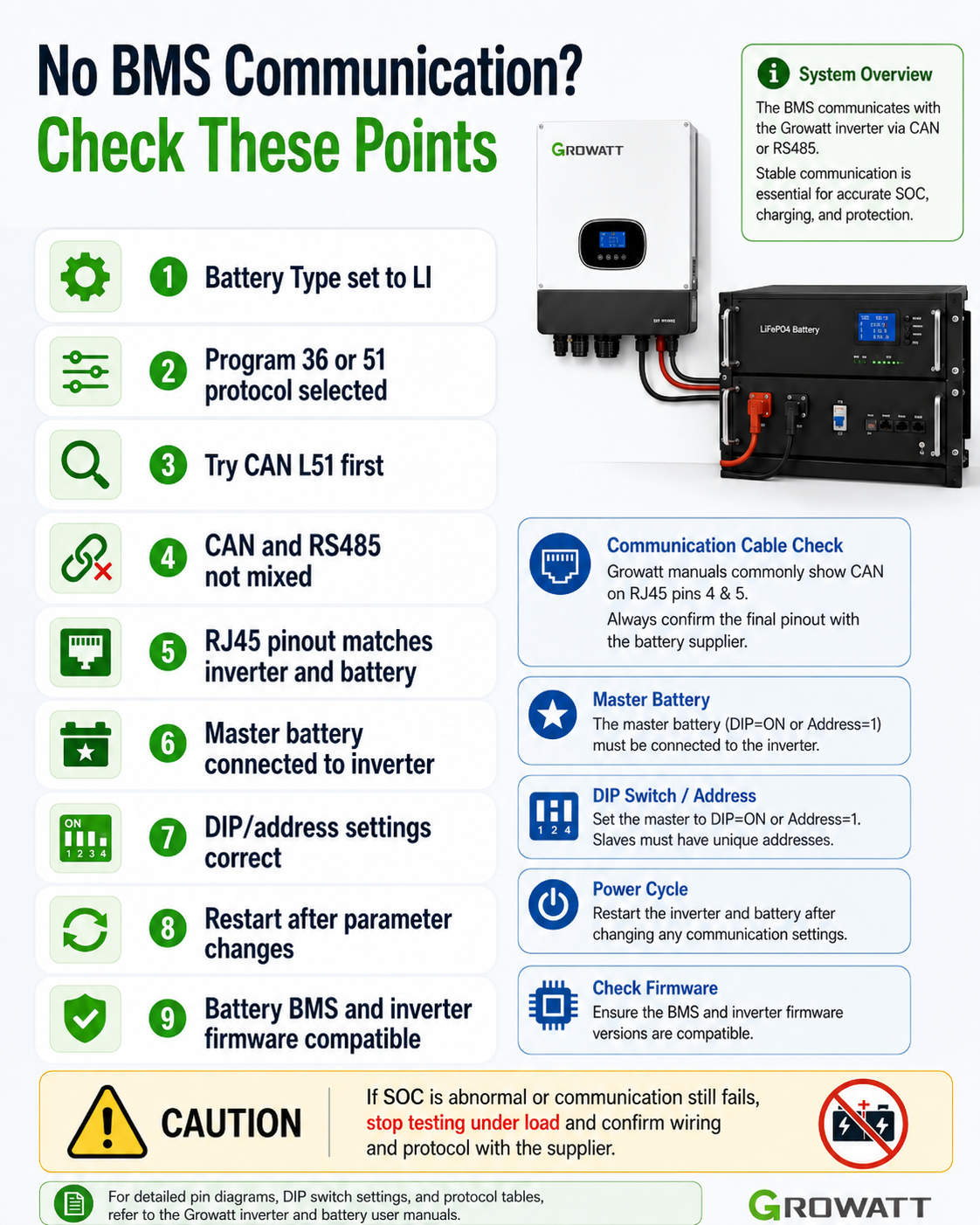
If the inverter cannot communicate with the battery BMS, check the following points:
- The battery type has been set to LI
- The correct Program 36 or Program 51 protocol has been selected
- CAN and RS485 ports have not been confused
- The RJ45 cable pinout matches both inverter and battery
- The battery master pack is connected to the inverter
- Battery DIP/address settings are correct
- The inverter and battery have been restarted after changing protocol settings
- The selected protocol is supported by the battery BMS
- Battery firmware and inverter firmware are compatible
If SOC suddenly shows an abnormal value, or the inverter reports communication failure, do not continue repeated testing under load. Turn off the system safely and confirm the wiring, protocol, and BMS settings with the supplier.
8. How CHSHNY Supports Installers
CHSHNY provides stronger matching support for installers, distributors, EPC companies, and solar storage project teams using Growatt inverters with LiFePO4 batteries. Our goal is not only to supply battery products, but also to help customers reduce communication problems before installation and shorten commissioning time on site.
For Growatt inverter projects, CHSHNY can support customers with:
- 48V/51.2V LiFePO4 battery model selection for residential, off-grid, backup power, and small commercial solar systems
- CAN and RS485 communication method confirmation before delivery
- Recommended Growatt protocol setting guidance, including CAN L51 as the simple first option when supported by the BMS
- Battery BMS parameter checking, including charge current limit, discharge current limit, SOC display, alarm logic, and protection behavior
- Matched communication cable guidance, including RJ45 pinout confirmation and ready cable recommendations when the project requirements are confirmed
- Parallel battery connection planning, master/slave setup suggestions, and DIP/address setting guidance
- Pre-delivery compatibility discussion for Growatt and other common inverter brands
- Remote commissioning support for installers by WhatsApp, video, photos, and parameter screenshots
- Troubleshooting support when the inverter shows BMS communication errors, abnormal SOC, charging limitation, or protocol mismatch
- Project support for distributors who need repeatable battery and inverter matching solutions for local customers
With stronger battery and inverter matching support, installers can complete Growatt system commissioning more confidently, reduce repeated site visits, and give end users a more stable energy storage experience.
Conclusion
Connecting a LiFePO4 battery to a Growatt inverter is not only a matter of power cables. The BMS communication cable, lithium battery mode, and protocol selection are equally important.
For many Growatt off-grid inverter models, the typical process is to connect the battery power cables correctly, connect the BMS communication cable to the correct CAN port, set Program 05 to LI, and then choose L51 as the recommended first CAN protocol to test under Program 36 or Program 51 depending on the model.
Because protocol compatibility depends on both the inverter and the battery BMS, customers should confirm the correct settings before installation. CHSHNY welcomes solar installers, distributors, and project companies to contact our team for battery and inverter matching support.
For Growatt inverter and CHSHNY LiFePO4 battery matching support, please contact us:
WhatsApp / Mobile: +971 55 428 3733